High-quality network bandwidth allows you to make your Ringover business calls in optimal conditions of fluidity and clarity. In this article, you will learn how to accurately test your internet connection with Speed Test and analyse your results to guarantee excellent call quality.
1. Run the Connection Analysis on Speed Test
To reliably evaluate your connectivity, we recommend running the test three times so you can calculate an average of your speeds and latency:
- Go to the homepage of Speed Test.
- Select the test server of your choice from the drop-down menu (use the search fields if necessary).
- Click the GO button to start analysing your connection.
- Repeat this test three times in a row to establish a representative average (or keep the latest result if the differences are minimal).
- Click the “Copy Link” option located on the right at the end of the test to save your results.
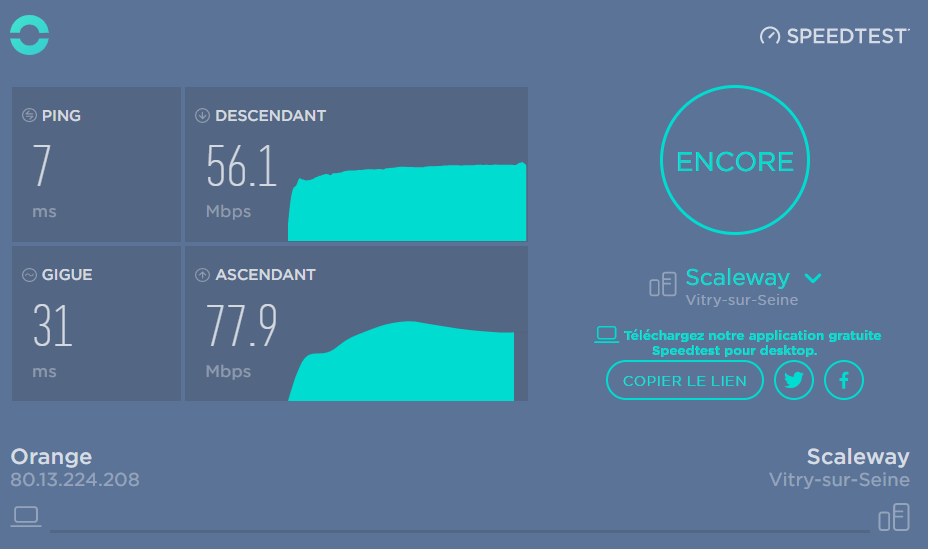
2. Analyse Your Internet Speeds (Download and Upload)
Speeds determine how fast data travels between your computer and the internet. High values ensure your communications won't be slowed down:
Download Speed
- What it is : Refers to downloading data from the internet to your computer (for example, loading a web page or downloading music).
- Recommended value : For good connectivity, the value should be greater than 30 Mbps and the gauge should be positioned as far to the right as possible.
Upload Speed
- What it is : Refers to sending data from your computer to the internet (for example, posting a photo to a website or transmitting your voice stream in real time).
- Recommended value : For your callers to hear you clearly, the value should be greater than 30 Mbps and the gauge should be positioned as far to the right as possible.
3. Check Your Network Responsiveness (Ping and Jitter)
Voice over IP (VoIP) is extremely sensitive to data packet transmission. To avoid audio lag, you must ensure your connection is stable:
Latency (Ping)
- What it is : The shortest time it takes for a data packet to make a round trip between your computer and the remote server (measured in milliseconds).
- Recommended value : It should be under 50 ms for smooth connectivity and minimal loading times.
- Risk of degradation : If your ping exceeds 150 ms, it can cause a noticeable lag (echo or dead air) in your phone calls.
Jitter
- What it is : The variation of latency (ping) over time. If jitter is close to zero, your connection is steady and consistent.
- Recommended value : The general value should be under 50 ms, but the optimal comfort threshold for calls is below 20 ms.
- Risk of degradation : High jitter means audio packets arrive at irregular intervals. The audio stream will not transmit properly, and you will hear the caller's voice speed up or sound “robotic” (as soon as the 20 ms threshold is crossed).
🎉 You now know how to measure your bandwidth and analyse your connection test results to guarantee flawless audio quality with Ringover!