
Configuring your background settings allows you to ensure the Ringover application receives calls even when it is running in the background. In this guide, you’ll learn how to adjust your mobile data and application permissions to prevent call blocking.
Configure background settings to receive calls
1. Enable mobile data roaming
First, make sure your mobile data networks are properly configured so your phone does not block data by default.
- Go to settings on your phone.
- Select "Mobile Data Networks".
- Select "Mobile Data".
- Select "Mobile Data Roaming".
2. Allow app notifications
Next, you need to ensure the Ringover app has the correct permissions to alert you of incoming calls.
- Go to "Settings".
- Select "Applications".
- Select "Ringover".
- Allow all notifications.
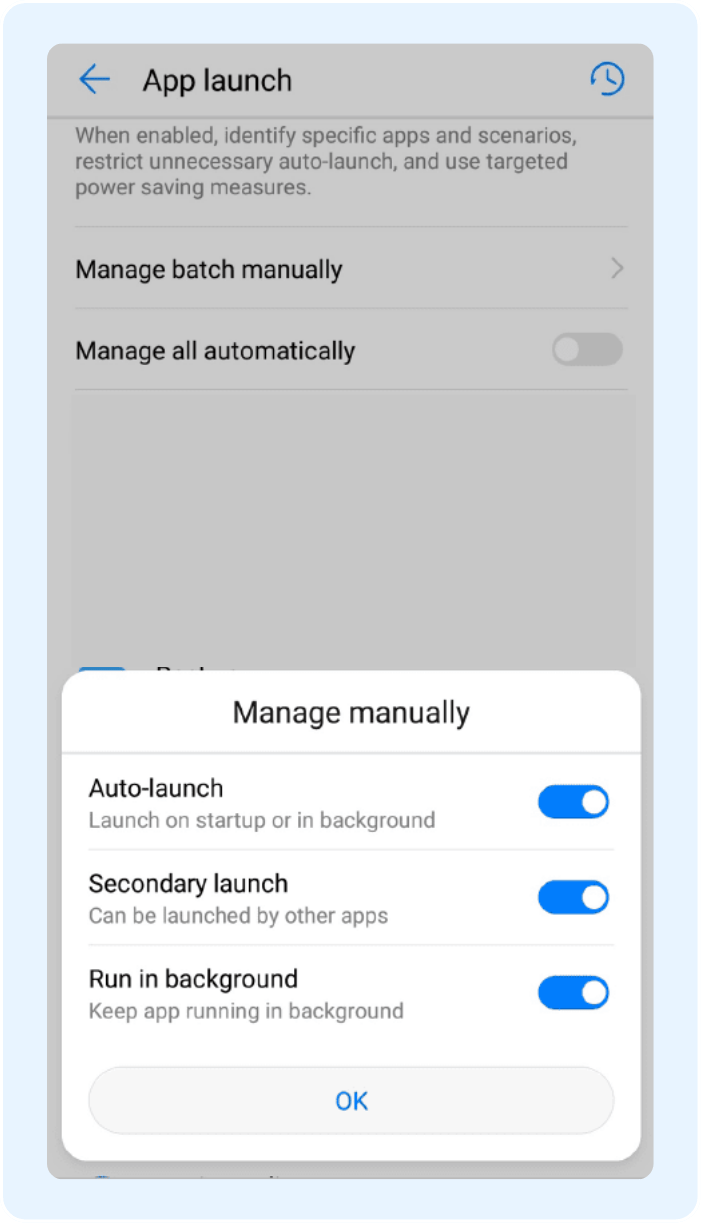
3. Manage app launch settings
Finally, you must configure how your phone handles the app launch to keep it active and ready to receive calls in the background.
- Disable "Automatically managed app launch".
- Enable the 3 options shown below ✅.
Always double-check these settings after a major phone update, as permissions can sometimes be reset!
🎉 You now know how to configure your background settings and can seamlessly receive all your incoming calls!