
Checking your business verification status on Facebook Business Manager is crucial for securing your account and unlocking advanced business features. In this guide, you’ll learn how to navigate to your business settings, find your verification status, and understand what each status indicator means for your brand.
Verify your status
1. Navigate to your business settings
Access your company's profile information within Facebook Business Manager to locate your security and verification details.
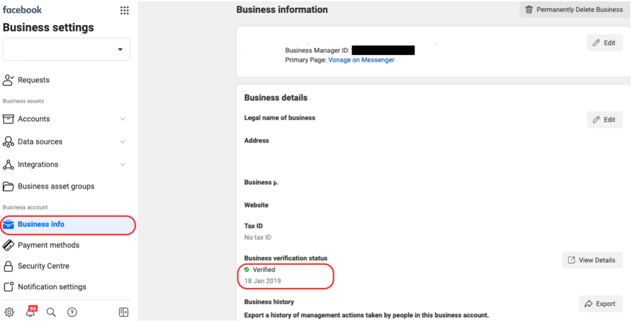
Go to the settings page in your Facebook Business Manager.
Scroll through the left-hand menu and click on the Business Information tab.
Locate the section labeled Business Verification Status.
2. Understand your verification status
Review the status message displayed under the verification section to determine your next steps.
Status: Verified
What it means: Your business verification is complete.
What you'll see: A green checkmark, the word "Verified", and your official verification date.
Status: Under Review
What it means: You have successfully completed and submitted your application, and it is currently being evaluated by Facebook.
What you'll see: "Under Review" status. Under normal conditions, Facebook will provide an update within 48 hours. No further action is required from you at this time.
Status: Not Verified
What it means: You still need to submit or complete your business verification application.
What you'll see: "Not Verified" status.
More details : 🔗 How to set up WhatsApp in Ringover
🎉 You now know how to check your Facebook Business Manager verification status and identify exactly what steps to take to keep your account active and verified!